

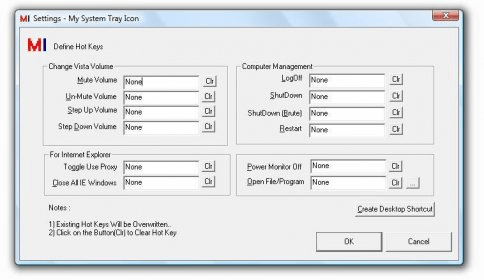
A system tray icon that allows users to access a range of features, such as power monitoring, restarting the computer, logging off, shutting down, increasing/decreasing volume, muting/un-muting, running programs/opening files, and toggling use of a proxy by defining hot keys. Registered users can also request additional features. The trial version has no nagging pop-ups and registered users can upgrade for free.
Power Monitor Off , Restart Computer , Log Off , Shut Down , Increase/Decrease Volume , Mute/Un-Mute , Run Program/Open File , Toggle Use Proxy by defining Hot Key for each/any one of them. All the features can be accesses using Right Click on System Tray Icon. Registered users can send in request to add relative feature(s). Trial Version does not have any nagging pop-ups.Registered Users Can send request to get relative feature(s) added.
Trial Version Does not have any Naggin Pop-Ups.Upgrades for Registered Users at No Extra Cost.Registered Users Can send request to get relative feature(s) added(at no extra cost). Run all features using Menu on Right Click of the System Tray Icon.Setup adds the program to run on Windows Startup.




Comments (1)